
Show Posts

This section allows you to view all posts made by this member. Note that you can only see posts made in areas you currently have access to.


Messages - Highstorm

Pages: [1]
1
Do you have the "Content Origin" of your ScrollView set to "TopLeft"? Do so, and then right-click on the UIScrollView component and choose ResetClippingPosition. This should re-position your table to the top-left of the scroll view, or any other origin you choose.

To do this in code, call UIScrollView.ResetPosition();

Does that help with your issue?
2
NGUI 3 Support / Re: UICamera.inputHasFocus problem since 3.5.6 update
« on: April 23, 2014, 10:11:13 AM »
Perfect! Thanks, Aren!

3
NGUI 3 Support / Re: UICamera.inputHasFocus problem since 3.5.6 update
« on: April 22, 2014, 11:24:18 AM »
Hi Aren, thanks for the reply.

Either I'm not understanding what you mean (I am still quite new to coding, apologies), or I did not explain myself clear enough.

What it boils down to is this: I used to use the inputHasFocus bool to determine when a UIInput component was actively being typed in. What can I use post 3.5.6 to do the same?

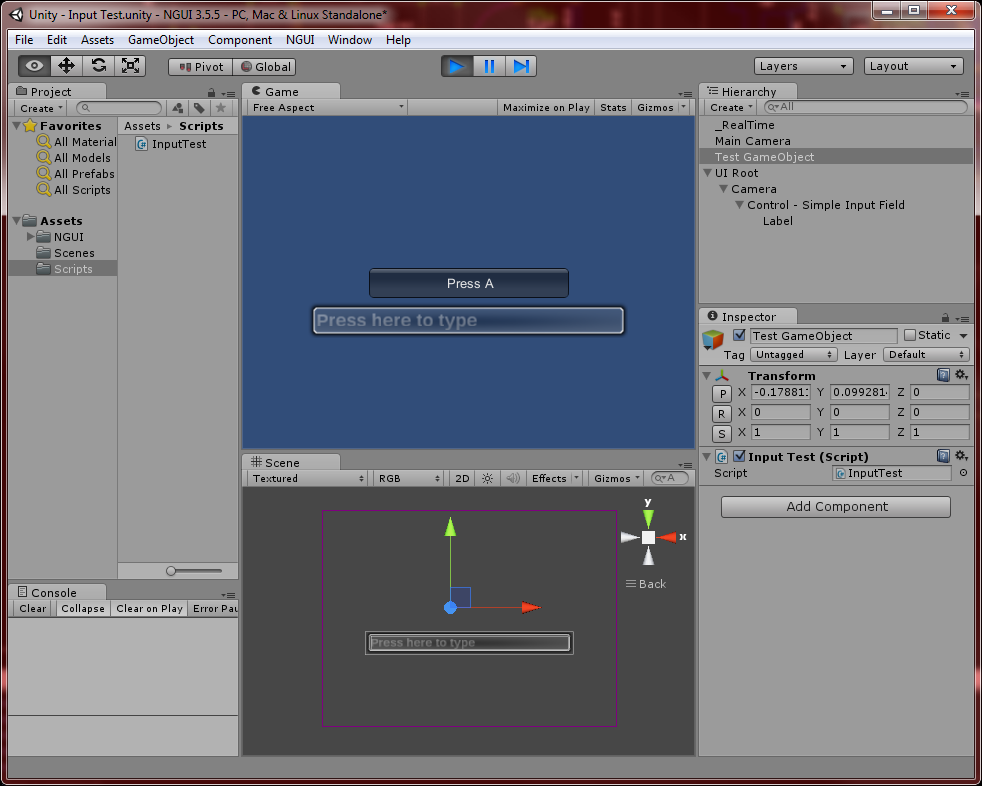
The following is a simple project setup to demonstrate the issue:


InputTest.cs
  1. using UnityEngine;
  2. using System.Collections;
  3.  
  4. public class InputTest : MonoBehaviour {
  5.        
  6.         bool swapColor;
  7.        
  8.         void Update ()
  9.         {
  10.                 if( !UICamera.inputHasFocus && Input.GetKeyDown (KeyCode.A) )
  11.                 {
  12.                         swapColor = !swapColor;
  13.                 }      
  14.         }
  15.        
  16.         void OnGUI () {
  17.                
  18.                 if( swapColor )
  19.                 {
  20.                         GUI.color = Color.red;
  21.                 }
  22.                 else GUI.color = Color.white;
  23.                
  24.                 GUI.Button (new Rect((Screen.width * 0.5f) - 100, (Screen.height * 0.5f)-15, 200, 30), "Press A");
  25.         }
  26. }

When you press "A", the Unity button will toggle its color red and back.
  • In NGUI 3.5.5, typing "aaaaa" into the input field leaves the button black. This is the desired result.
  • In NGUI 3.5.6 and on (3.5.8 in my tests), typing "aaaaa" into the input field toggles the button color with each press of the key.

4
Hi ArenMook,

The 3.5.6 update featured this fix, presumably in response to this thread:
Quote
- FIX: UICamera's 'inputHasFocus' flag is now set when selection changes rather than every frame.

Previously I was using UICamera.inputHasFocus to prevent custom key bindings from firing while typing in an input field with a simple check:
  1. if( !UICamera.inputHasFocus ) {
  2. //Custom key coding
  3. }

This does not work since the update, I assume because it is no longer checked every frame. The fix log states that the flag is set when the "selection changes"; does that mean when you click into an input field and/or out of it as well? Because in all my tests, I can't seem to get inputHasFocus to set true at all.

With both 3.5.6 and the latest 3.5.8, I set up a new project with just NGUI, and added your "Control - Simple Input Field", along with a test script to return the status of UICamera.inputHasFocus. Clicking into the input, typing, clicking outside - none of these seem to set the bool true;

Am I just using this wrong since the update? If so, I would greatly appreciate some insight into its proper usage.

Thanks.

5
NGUI 3 Support / Re: option "Sliced Sprite" is not showing up
« on: May 04, 2013, 07:27:33 PM »
See here

Pages: [1]