Show Posts

This section allows you to view all posts made by this member. Note that you can only see posts made in areas you currently have access to.


Messages - chrisfirefox

Pages: [1]
1
NGUI 3 Support / Request: Localisation reference (e.g. for UIPopupList)
« on: September 12, 2016, 07:50:43 AM »
You have a very nice example for a localization class included in NGUI, but for various reasons I had to roll my own. The UIPopupList (again ;)) allows to localize the entries, but they statically use Localization.Get(), requiring to override this in a derived class.

I'd like to suggest that we find some kind of centralized reference to the localization which can easily be plugged in and exchanged on demand, and that the static Localization.Get is only used as a fallback. I'm not that tough on patterns, but I believe defining an interface to implement and a static reference on UICamera should do the trick, like so:

  1. interface NGUILocalization {
  2.   public string Get( string key );
  3.   public string[] knownLanguages { public get; }
  4.   public string language { public get; }
  5. }
  6. [...]
  7. public class UICamera {
  8. [...]
  9.   public static NGUILocalization loca;
  10.  
  11. /* Then you could access it like so */
  12. lbl.text = isLocalized ? UICamera.loca.Get(s) : s;
  13.  
I hope that makes sense, if there is a better Pattern to get this done, I'm happy to use that one, I'm not that firm on the details of all available design patterns and their C# implementation :).

2
Thanks :)

3
I've written a class derived from UIPopupList which uses all its functionality and makes only some very minor changes, since the base is already very good ;). But on every update I have to modify UIPopupList.cs to make some members and methods protected, so maybe you could incorporate these changes into your next update so I can save a little time, thanks!

Static Members to be made protected
  • mChild
Properties
  • isValid
  • activeFontSize
  • activeFontScale
Methods
  • Animate

4
NGUI 3 Support / Ignoring menu item NGUI error, Unity 5.4.1 plus Fix
« on: September 09, 2016, 04:16:29 AM »
Hey Arenmook, after upgrading to Unity 5.4.1 (from 5.3.6p1) and upgrading to NGUI 3.10.1, Unity kept complaining on me on every recompile like this:
Quote
Ignoring menu item NGUI because it is in no submenu!
So I looked into it, and it turns out that this is the problem in NGUIMenu.cs Line 715+:
  1.        
  2.         [MenuItem("NGUI/", false, 11)]
  3.         static void Breaker () { }
  4.  
  5.         [MenuItem("NGUI/Help", false, 12)]
  6.         static public void Help () { NGUIHelp.Show(); }
  7.  

It can be easily fixed by removing the "Breaker" lines and increasing "Help" Priority by 10, like so:
  1.        
  2.         [MenuItem("NGUI/Help", false, 22)]
  3.         static public void Help () { NGUIHelp.Show(); }
  4.  

Then Unity shuts up :)

5
Related question: Is this intentional, essentially clearing "value" of UIPopuplist every time it is changed in Line 17 (Original File Line 315)? Because it looks like a bug to me, and after the "onChange" event, "UIPopupList.value" is cleared, which doesn't make sense to me (hope it isn't a problem to post a minor part of the proprietary code, if so, please delete it)
  1.         /// <summary>
  2.         /// Set the current selection.
  3.         /// </summary>
  4.  
  5.         public void Set (string value, bool notify = true)
  6.         {
  7.                 if (mSelectedItem != value)
  8.                 {
  9.                         mSelectedItem = value;
  10.                         if (mSelectedItem == null) return;
  11. #if UNITY_EDITOR
  12.                         if (!Application.isPlaying) return;
  13. #endif
  14.                         if (notify && mSelectedItem != null)
  15.                                 TriggerCallbacks();
  16.  
  17.                         mSelectedItem = null;
  18.                 }
  19.         }

6
NGUI 3 Documentation / Re: UIScrollView
« on: February 12, 2016, 04:25:42 AM »
Reset Position controls where the scroll view ends up when its position is reset programmatically. This value is relative to the width and height of the content. The starting value (0, 0) means top left corner. If you wanted a centered reset point, you would specify (0.5, 0.5).
A little request for updated documentation, as far as I understood the code, the "Reset Position" Values has been replaced with "Content Origin", but the documentation (first post of this topic) still states that it is there.

7
NGUI 3 Support / NGUI in Standard Assets
« on: February 17, 2015, 03:31:49 AM »
Dear ArenMook,

I am developing rather big projects with dozens of packages imported from various sources, but most of them from the asset store, and NGUI being one of the most important and central ones. Now I have made the experience that for day-to-day development of bigger projects, it is paramount to move as much of the "not daily worked on" code, especially that of externally maintained packages, into "Standard Assets". This keeps Unity's "changing just a few lines of code"-compiletime down to a minimum, by moving most of the workload into the "firstpass"-Projects that only get compiled when necessary. This requires a quite tedious splitting process, as every "Editor"-Directory of every Standard Assets Package needs to be moved to Standard Assets/Editor/ to be recognized as "Editor firstpass".

And of course, whenever there is a package update - which is rather frequent for NGUI, thank you for such an active development! - and files are added or removed (luckily mere changes are recognized by Unity's package importer), this starts over with searching for the "new bits and pieces" and moving them into place. Now my question is, why isn't NGUI's package delivered as "Standard Assets" package by default? This of course applies to almost anything one can buy at the Asset Store, but aside from requiring two directories instead of a single one (which doesn't seem to be a problem with stuff like Gizmos), I don't see a good reason for it. There would even be a clear distinction between Pro Standard Assets (which could and should hold packages requiring Unity Pro) and Standard Assets (which also work on free). Maybe you can enlighten me, especially with your insights of having worked at Unity yourself (if that is legally possible, of course!), thank you :).

8
Hey there,

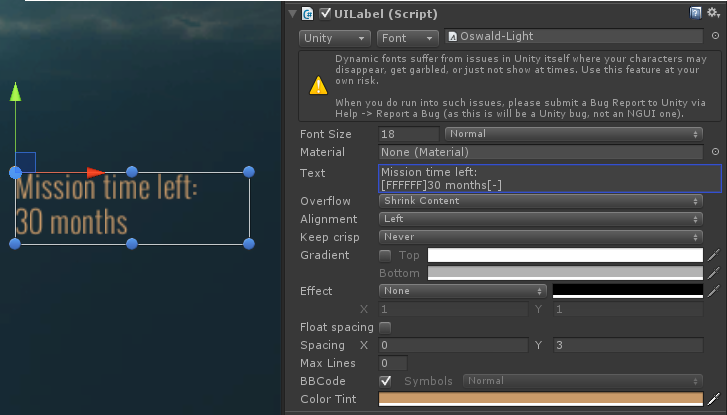
I'm on Version 3.7.7 of NGUI Pro, and I believe to remember that using bbcode, I was able to output any color of text regardless of base Component tint.

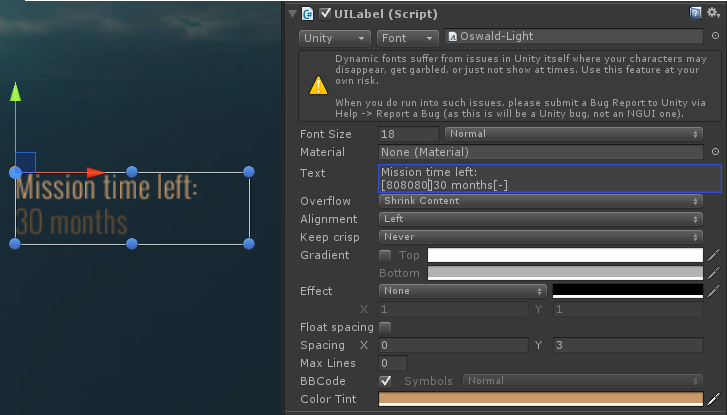
Right now I observe a behaviour that just tints the base tint of the rendered text with the desired color, instead of replacing it. An example: I want to have a tint of the label of #ca9b6a, and in the second line of the label, I want a text in white.

I tried it as shown in the following picture, which had no effect:


And instead of replacing the lower part with grey, it just darkens the brown color of the label here:


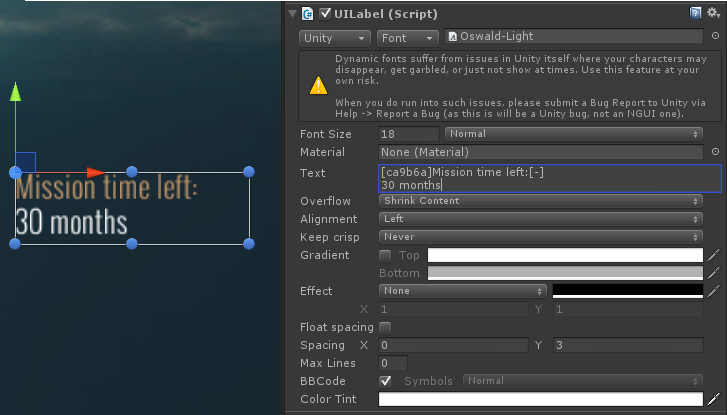
It works fine if I invert the colors, meaning I use a white tint and just colorize the brown parts:


As I said, this might also be my memory fooling me, but I believe that was different in previous versions. IMHO it is rather impractical to be forced to have white tint for any type of multicolored label text. Therefore I would vote for this behaviour to be changed to a more intuitive "replace" instead (or fixed if it is unintended). Or at least make an option available to switch between the two behaviours of tint and replace.

I just wanted to add that NGUI is one of the greatest extensions to Unity I ever encountered, documentation could be better, but functionality is simply top of the notch, super flexible and yet super powerful, thank you very much for creating this!

9
I'd suggest you have a look at ProcessText in UILabel.cs. This is where the "magic" of shrinkwrapping the text happens. Basically you could do the same for both of your texts in your own code, finding out which of the two requires the lower "mPrintedSize" (equals Fontsize) to be completely displayed. Then you can set the font size on both (or any number of) your UILabels manually and leave the UILabel components at ClampContent, meaning the labels won't be resized at all. Provided of course that you have access to NGUI source.

10
Dear ArenMook,

we used NGUI, which is a great way of interpreting the 3D Gameobjects of Unity for 2D User Interfaces and a charm to make UI with I must say, to make all of our User Interfaces for our recently release rpg game. We ran into a problem already described here that sometimes in DirectX 11 mode the UI isn't drawn at all, which is especially bad as we also use NGUI for the fadein to our intro - making the screen stay blank for the users with this problem. We found out that this can either be fixed by updating Graphics cards drivers - but not always - or using the -force-d3d9 - Parameter of Unity to start. Which in turn makes some of our Posteffects so dead slow that the game becomes unplayable.

Do you have a suggestion how to tackle this problem? There is several things I won't be able to do immediately:
- Upgrade Unity - not an option as this might cause *really* unforseen problems
- Upgrade NGUI - if I do that, I'm afraid that some of my adaptions will get lost, and cause more problems as this is an RPG with a *lot* of different Windows, and we are currently not really up for additional unforseen trouble
- Remove DX11 support - I tried that and the game got slower. As the optimization is still not that good, and several players already complained about bad performance, I wouldn't like to add to this problem complex

Maybe there is something you stumbled over some quick fix since your last reply to whatever causes this strange problem, I would really appreciate some help in getting to the base of this, thank you!

kind regards
Chris

Pages: [1]