Show Posts

This section allows you to view all posts made by this member. Note that you can only see posts made in areas you currently have access to.


Messages - dendenny01

Pages: [1]
1
NGUI 3 Support / Adding a material to NGUI objects
« on: June 11, 2015, 11:19:29 PM »
How can i add a material to UITexture.
I want to use Mobile Movie Texture.where i need to add a material on which video will be played.But when material is added the texture remain transparent and does not fill with the added material. Material has a shader.

2
NGUI 3 Support / Re: Calling a method after tweening throgh script
« on: January 18, 2015, 05:22:06 AM »
Thanks a Lot...!!!It finally worked
And sorry for the last part. Actually wanted to know is there a better a way to the code running
But i think for now its working fine
Once again thank you.. (:D)

3
NGUI 3 Support / Calling a method after tweening throgh script
« on: January 17, 2015, 12:37:30 AM »
I trying to create a Transition Effect Like a seen in Slide show
where I have 3 Slides to be Precise Sprites(slide)
There is  a method on slide 2 that i want to call when Slide 1 finishes it Tweening
Calling a method By adding it to onFinish in the inspector of slide 1 is not give the correct transition that i want to achieve
Is there any way to do the same through scripting Like adding the method through Event Delegate...?
this is the sample snippet that i am using but could not find out what is going wrong

  1. private bool isReversedFinished = false;
  2. private bool death = false;
  3. public TweenPosition overlayScreen;
  4. public TweenPosition LevelStats;
  5.  
  6. void update(){
  7.    if (contact.normal.y < 0.9f){
  8.         death = true;
  9.         deathImminant();
  10.    }
  11. }
  12.  
  13. void  deathImminant(){
  14.   Overlay.delay = 3f;
  15.   EventDelegate.Set(Overlay.onFinished, TweenStats);
  16.   Overlay.PlayReverse();  
  17. }
  18.  
  19. public void TweenStats(){
  20.         LevelStats.Play();
  21. }
  22.  

4
NGUI 3 Support / OnHover Triggered when Clicked
« on: January 09, 2015, 08:56:24 PM »
I have a simple script.To tween  a Button Position and width onHover. The problem that am facing is the script works fine when the mouse is hover on the button but when it is clicked the onHover method is triggered twice. Below is the code that i am ususing. I wanted to know is there any way to detect mouse click.
Original Code without mouse click Detction
  1. public TweenPosition tweenPosition;
  2. public TweenWidth tweenWidth;
  3.  
  4. void OnHover(bool isOver){
  5.       if(isOver){
  6.           tweenPosition.enable=true;
  7.           tweenWidth.enable=true;
  8.           Debug.Log("Event Hover");
  9.       }else{
  10.           tweenPosition.enable=true;
  11.           tweenWidth.enable=true;
  12.           Debug.Log("Event Hover Over");
  13.       }
  14.      
  15. }
  16.  

I want to achieve something like this code below but does not know how can i detect the click event
  1. void OnHover(bool isOver){
  2.       if(isOver && !clicked){
  3.           Debug.Log("Event Hover without click");
  4.       }else if(isOver && clicked){
  5.           Debug.Log("Event Hover with click");
  6.       }else{
  7.           Debug.Log("Event Hover Over");
  8.       }
  9.      
  10. }
  11.  

5
NGUI 3 Support / Dynamically Add Sprite in ScrollView
« on: July 02, 2014, 05:39:55 AM »
How can I add Sprite/Button in the scrollview dynamically the number of sprites to be added depends upon number of elements present in the array and the label of the button/sprite is the string in the array present for that particular sprite/button

Any type of help will be appreciated

6
NGUI 3 Support / Grouping Scroll view with an Image as its Background
« on: June 23, 2014, 10:47:34 AM »
The scenario is that i have a Toggle button and two Scroll View each having a image to be sat as their background
When The Button is in checked state one of the two scroll view is Visible and the other is hidden where is when the button is in off state the second scroll view is visible.

But the Problem that I am having is  how can I group the background image and its respective scroll view together
I had tried to achieve the result by using an Invisible widget but the efforts were in vein
the depth is One of the big problem which are making the scroll view overlap
here is the Hierarchy

UIRoot(2D)
|
-Camera
  |
  --Panel
     |
     ---Anchor-left
     |   |               /**More GUI**/
     |    ----panel
     |
     ---AnchorTop  /*Scroll*/
         |
         ----Panel
               |
               -----Container1
               |       |
               |        ------ScrollView
               |       |
               |        ------Background
               |
               -----Container1
                      |
                       ------ScrollView
                      |
                       ------Background

7
NGUI 3 Support / Sliding toggle Button
« on: June 20, 2014, 11:57:45 PM »
It been quite a while I have been using NGUI and it had worked like a charm for me.
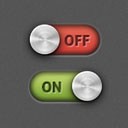
I would like to know how can I achieve the sliding toggle Button Behavior
the toggle Button I am looking is like the On/off slide button in Iphone where you have to slide
to change the state


How can I create this sliding Button any help will be appreciated

Pages: [1]