Show Posts

This section allows you to view all posts made by this member. Note that you can only see posts made in areas you currently have access to.


Messages - spil778

Pages: [1]
1
NGUI 3 Support / Re: Adding buttons to a scrollview?
« on: March 11, 2015, 03:42:47 PM »
None? :c

2
NGUI 3 Support / Re: Adding buttons to a scrollview?
« on: March 07, 2015, 10:48:42 AM »
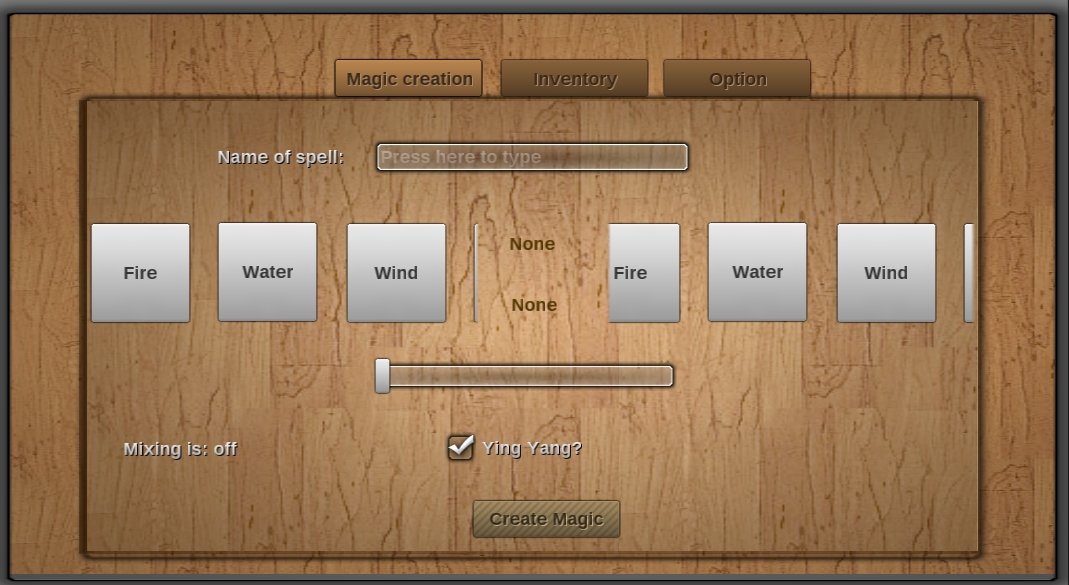
I dont really know where to begin thats my point. Well sorry let me give you some more info my gui setup looks like this:


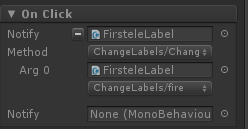
The Onclick for my button looks like this:


The change label script is just this (I will add the new elements onto it)
  1. using UnityEngine;
  2. using System.Collections;
  3.  
  4. public class ChangeLabels : MonoBehaviour {
  5.         public UILabel labelRef;
  6.  
  7.         public string fire{
  8.                 get{return "Fire";}
  9.         }
  10.         public string water{
  11.                 get{return "Water";}
  12.         }
  13.         public string earth{
  14.                 get{return "Earth";}
  15.         }
  16.         public string wind{
  17.                 get{return "Wind";}
  18.         }
  19.        
  20.         public void ChangeLabel (string name){
  21.                 GetComponent<UILabel> ().text = name;
  22.         }
  23. }
  24.  

  1. using UnityEngine;
  2. using System.Collections.Generic;
  3. using System.Collections;
  4. using System;
  5. using System.IO;
  6. using System.Xml;
  7.  
  8. public class addmagic : MonoBehaviour
  9. {
  10.         public GameObject frstLabel;
  11.         public GameObject scdLabel;
  12.         public GameObject mixLabel;
  13.         public GameObject name;
  14.         public string ele1;
  15.         public string ele2;
  16.        
  17.         public UILabel label1;
  18.         public UILabel label2;
  19.         public UILabel mixlabelRef;
  20.         public UILabel nameRef;
  21.  
  22.         private int temp;
  23.         private string magicPath;
  24.        
  25.         List<KnownElements> known = new List<KnownElements>();
  26.        
  27.         public Element fire{
  28.                 get{return Element.Fire;}
  29.         }
  30.         public Element water{
  31.                 get{return Element.Fire;}
  32.         }
  33.         public Element earth{
  34.                 get{return Element.Earth;}
  35.         }
  36.         public Element wind{
  37.                 get{return Element.Wind;}
  38.         }
  39.         /// <summary>
  40.         /// Different elements to use
  41.         /// </summary>
  42.         public enum Element
  43.         {
  44.                 None = 1<<0,
  45.                 Fire = 1<<1,
  46.                 Water = 1<<2,
  47.                 Earth = 1<<3,
  48.                 Wind = 1<<4,
  49.                 Scorch = 1<<5,
  50.                 Steam = 1<<6,
  51.                 Lava = 1<<7,
  52.                 Gas = 1<<8,
  53.                 Fluid = 1<<9,
  54.                 Tsunami = 1<<10,
  55.                 Ice = 1<<11,
  56.                 Magma = 1<<12,
  57.                 Metal = 1<<13,
  58.                 Wood = 1<<14,
  59.                 Sand = 1<<15,
  60.                 Lightning = 1<<16,
  61.                 Stream = 1<<17,
  62.                 Tornado = 1<<18,
  63.                 Poison = 1<<19,
  64.         }
  65.        
  66.         /// <summary>
  67.         /// Effects
  68.         /// </summary>
  69.         public enum Effect
  70.         {
  71.                 None,
  72.                 Fire,
  73.                 Water,
  74.                 Earth,
  75.                 Wind,
  76.                 Scorch,
  77.                 Steam,
  78.                 Lava,
  79.                 Gas,
  80.                 Fluid,
  81.                 Tsunami,
  82.                 Ice,
  83.                 Magma,
  84.                 Metal,
  85.                 Wood,
  86.                 Sand,
  87.                 Lightning,
  88.                 Tornado,
  89.                 Stream,
  90.                 Poison,
  91.         }
  92.        
  93.         void Awake() {
  94.                 known.Add (new KnownElements("Fire"));
  95.                 known.Add (new KnownElements("Water"));
  96.                 known.Add (new KnownElements("Wind"));
  97.                 known.Add (new KnownElements("Earth"));
  98.  
  99.                 frstLabel = GameObject.FindWithTag ("FrstEleLabel");
  100.                 scdLabel = GameObject.FindWithTag ("ScdEleLabel");
  101.                 mixLabel = GameObject.FindWithTag ("mixlabel");
  102.                 name = GameObject.FindWithTag ("name");
  103.  
  104.                
  105.                 label1 = frstLabel.GetComponent<UILabel> ();
  106.                 label2 = scdLabel.GetComponent<UILabel> ();
  107.                 mixlabelRef = mixLabel.GetComponent<UILabel> ();
  108.                 nameRef = name.GetComponent<UILabel> ();
  109.  
  110.                 label1.text = "None";
  111.                 label2.text = "None";
  112.                 magicPath = Application.dataPath.ToString() + "/Magic";
  113.         }
  114.         /// <summary>
  115.         /// Elemet to Effect lookup table
  116.         /// </summary>
  117.         private readonly Dictionary<int, Effect> _lookUpTable = new Dictionary<int, Effect>()
  118.         {
  119.                 { (int)( Element.Fire | Element.Fire), Effect.Magma },
  120.                 { (int)(Element.Fire | Element.Water), Effect.Steam },
  121.                 { (int)(Element.Fire | Element.Earth), Effect.Lava },
  122.                 { (int)(Element.Fire | Element.Wind), Effect.Gas },
  123.                 { (int)(Element.Water | Element.Water), Effect.Fluid},
  124.                 { (int)(Element.Water | Element.Earth), Effect.Tsunami },
  125.                 { (int)(Element.Water | Element.Wind), Effect.Ice },
  126.                 { (int)(Element.Wind | Element.Earth), Effect.Sand },
  127.                 { (int)(Element.Wind | Element.Wind), Effect.Tornado },
  128.                 { (int)(Element.Earth | Element.Earth), Effect.Wood },
  129.                
  130.         };
  131.        
  132.         public void YingYangMixing()
  133.         {
  134.        
  135.                 Element element = (Element)System.Enum.Parse( typeof( Element ), label1.text);
  136.                 Element element2 = (Element)System.Enum.Parse( typeof( Element ), label2.text);
  137.  
  138.  
  139.                 //ADD NEW BUTTON FUNCTION HERE
  140.  
  141.                 if (mixlabelRef.text == "Mixing is: on") {
  142.                         Effect ret = Effect.None;
  143.                         if (!_lookUpTable.TryGetValue ((int)element | (int)element2, out ret)) {
  144.                                 Debug.LogError ("Element does not exist in Lookup table!");
  145.                         }
  146.                         else {
  147.                                 if (System.IO.Directory.Exists (magicPath) != true) {
  148.                                         Debug.Log("Didn't find it so creating it now");
  149.                                         System.IO.Directory.CreateDirectory (magicPath);
  150.                                 }
  151.                                
  152.                         }
  153.                 }
  154.         }
  155. }

I just finished my school exam and I am a bit rusten in C# and unity so is there anyone who can clearify:
the problem is that I have my list called "known" if the created effect is not on that list it should make a new button

3
NGUI 3 Support / Re: bitwise operation with 2 buttons and enums
« on: March 07, 2015, 06:16:26 AM »
My friend randomly came over (thought he was on vaction) Well he helped me. For people in the futhere here is the solution we came up with:
  1. using UnityEngine;
  2. using System.Collections.Generic;
  3.  
  4. public class addmagic : MonoBehaviour
  5. {
  6.         public GameObject frstLabel;
  7.         public GameObject scdLabel;
  8.         public string ele1;
  9.         public string ele2;
  10.  
  11.         public UILabel label1;
  12.         public UILabel label2;
  13.  
  14.         public Element fire{
  15.                 get{return Element.Fire;}
  16.         }
  17.         public Element water{
  18.                 get{return Element.Fire;}
  19.         }
  20.         public Element earth{
  21.                 get{return Element.Earth;}
  22.         }
  23.         public Element wind{
  24.                 get{return Element.Wind;}
  25.         }
  26.         /// <summary>
  27.         /// Different elements to use
  28.         /// </summary>
  29.         public enum Element
  30.         {
  31.                 None = 1<<0,
  32.                 Fire = 1<<1,
  33.                 Water = 1<<2,
  34.                 Earth = 1<<3,
  35.                 Wind = 1<<4,
  36.                 Scorch = 1<<5,
  37.                 Steam = 1<<6,
  38.                 Lava = 1<<7,
  39.                 Gas = 1<<8,
  40.                 Fluid = 1<<9,
  41.                 Tsunami = 1<<10,
  42.                 Ice = 1<<11,
  43.                 Magma = 1<<12,
  44.                 Metal = 1<<13,
  45.                 Wood = 1<<14,
  46.                 Sand = 1<<15,
  47.                 Lightning = 1<<16,
  48.                 Stream = 1<<17,
  49.                 Tornado = 1<<18,
  50.                 Poison = 1<<19,
  51.         }
  52.  
  53.         /// <summary>
  54.         /// Effects
  55.         /// </summary>
  56.         public enum Effect
  57.         {
  58.                 None,
  59.                 Fire,
  60.                 Water,
  61.                 Earth,
  62.                 Wind,
  63.                 Scorch,
  64.                 Steam,
  65.                 Lava,
  66.                 Gas,
  67.                 Fluid,
  68.                 Tsunami,
  69.                 Ice,
  70.                 Magma,
  71.                 Metal,
  72.                 Wood,
  73.                 Sand,
  74.                 Lightning,
  75.                 Tornado,
  76.                 Stream,
  77.                 Poison,
  78.         }
  79.        
  80.        
  81.         /// <summary>
  82.         /// Elemet to Effect lookup table
  83.         /// </summary>
  84.         private readonly Dictionary<int, Effect> _lookUpTable = new Dictionary<int, Effect>()
  85.         {
  86.                 { (int)( Element.Fire | Element.Fire), Effect.Magma },
  87.                 { (int)(Element.Fire | Element.Water), Effect.Steam },
  88.                 { (int)(Element.Fire | Element.Earth), Effect.Lava },
  89.                 { (int)(Element.Fire | Element.Wind), Effect.Gas },
  90.                 { (int)(Element.Water | Element.Water), Effect.Fluid},
  91.                 { (int)(Element.Water | Element.Earth), Effect.Tsunami },
  92.                 { (int)(Element.Water | Element.Wind), Effect.Ice },
  93.                 { (int)(Element.Wind | Element.Earth), Effect.Sand },
  94.                 { (int)(Element.Wind | Element.Wind), Effect.Tornado },
  95.                 { (int)(Element.Earth | Element.Earth), Effect.Wood },
  96.  
  97.         };
  98.        
  99.         public void YingYangMixing()
  100.         {
  101.                 frstLabel = GameObject.FindWithTag ("FrstEleLabel");
  102.                 scdLabel = GameObject.FindWithTag ("ScdEleLabel");
  103.  
  104.                 label1 = frstLabel.GetComponent<UILabel> ();
  105.                 label2 = scdLabel.GetComponent<UILabel> ();
  106.  
  107.                
  108.                 Element element = (Element)System.Enum.Parse( typeof( Element ), label1.text);
  109.                 Element element2 = (Element)System.Enum.Parse( typeof( Element ), label2.text);
  110.  
  111.                 Effect ret = Effect.None;
  112.                 if (!_lookUpTable.TryGetValue ((int)element | (int)element2, out ret)) {Debug.LogError( "Element does not exist in Lookup table!" );}
  113.                 else{ Debug.Log(ret);}
  114.  
  115.         }
  116.  
  117.  
  118.        
  119. }
  120.  

What we basicly did is we took the label and searched for them in the enum and then just did the bitwise directly.

4
NGUI 3 Support / bitwise operation with 2 buttons and enums
« on: March 07, 2015, 05:41:53 AM »
So I made code that basicly take 2 elements and make it into a single effect.
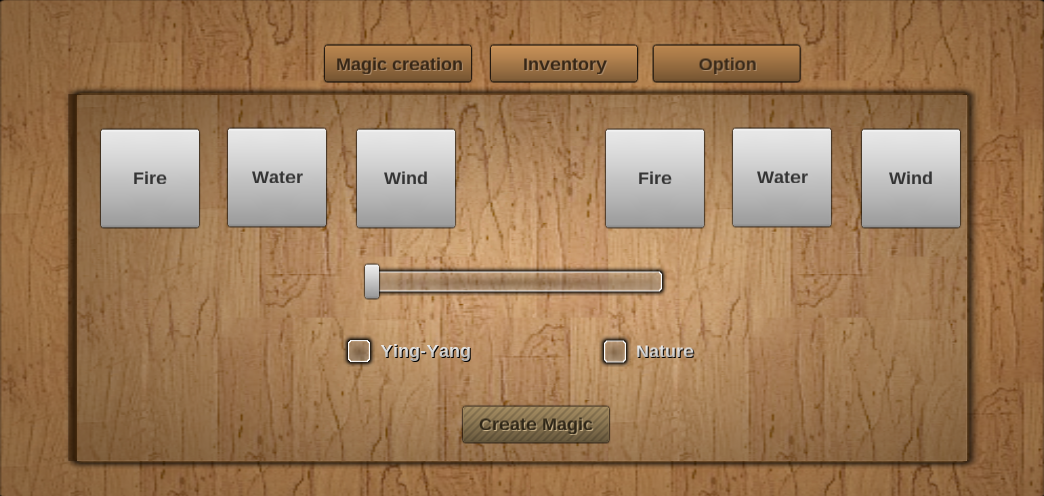
my NGUI set up looks like this:


The two scrollview is element 1 and 2 how can I get these and put it into my YingYangMixing?
So that the first fire button returns: Element.fire to the first space of the bitwise operation and the second button give that elements into the other part?

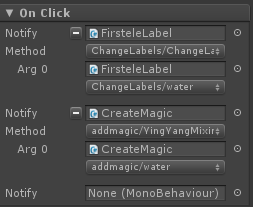
So far I set the buttons up like this:


  1. using UnityEngine;
  2. using System.Collections.Generic;
  3.  
  4. public class addmagic : MonoBehaviour
  5. {
  6.  
  7.         public Element fire{
  8.                 get{return Element.Fire;}
  9.         }
  10.         public Element water{
  11.                 get{return Element.Fire;}
  12.         }
  13.         public Element earth{
  14.                 get{return Element.Earth;}
  15.         }
  16.         public Element wind{
  17.                 get{return Element.Wind;}
  18.         }
  19.         /// <summary>
  20.         /// Different elements to use
  21.         /// </summary>
  22.         public enum Element
  23.         {
  24.                 None = 0,
  25.                 Fire = 1,
  26.                 Water = 2,
  27.                 Earth = 4,
  28.                 Wind = 8,
  29.                 Scorch = 16,
  30.                 Steam = 32,
  31.                 Lava = 64,
  32.                 Gas = 128,
  33.                 Fluid = 256,
  34.                 Tsunami = 512,
  35.                 Ice = 1024,
  36.                 Magma = 2048,
  37.                 Metal = 4096,
  38.                 Wood = 8192,
  39.                 Sand = 16384,
  40.                 Lightning = 32768,
  41.                 Stream = 65536,
  42.                 Tornado = 131072,
  43.                 Poison = 262144,
  44.         }
  45.        
  46.         /// <summary>
  47.         /// Effects
  48.         /// </summary>
  49.         public enum Effect
  50.         {
  51.                 None,
  52.                 Fire,
  53.                 Water,
  54.                 Earth,
  55.                 Wind,
  56.                 Scorch,
  57.                 Steam,
  58.                 Lava,
  59.                 Gas,
  60.                 Fluid,
  61.                 Tsunami,
  62.                 Ice,
  63.                 Magma,
  64.                 Metal,
  65.                 Wood,
  66.                 Sand,
  67.                 Lightning,
  68.                 Tornado,
  69.                 Stream,
  70.                 Poison,
  71.         }
  72.        
  73.        
  74.         /// <summary>
  75.         /// Elemet to Effect lookup table
  76.         /// </summary>
  77.         private readonly Dictionary<int, Effect> _lookUpTable = new Dictionary<int, Effect>()
  78.         {
  79.                 { (int)( Element.Fire | Element.Fire), Effect.Magma },
  80.                 { (int)(Element.Fire | Element.Water), Effect.Steam },
  81.                 { (int)(Element.Fire | Element.Earth), Effect.Lava },
  82.                 { (int)(Element.Fire | Element.Wind), Effect.Gas },
  83.                 { (int)(Element.Water | Element.Water), Effect.Fluid},
  84.                 { (int)(Element.Water | Element.Earth), Effect.Tsunami },
  85.                 { (int)(Element.Water | Element.Wind), Effect.Ice },
  86.                 { (int)(Element.Wind | Element.Earth), Effect.Sand },
  87.                 { (int)(Element.Wind | Element.Wind), Effect.Tornado },
  88.                 { (int)(Element.Earth | Element.Earth), Effect.Wood },
  89.  
  90.         };
  91.        
  92.         public void YingYangMixing( Element element )
  93.         {
  94.                 Effect ret = Effect.None;
  95.                 if (!_lookUpTable.TryGetValue ((int)element, out ret)) {Debug.LogError( "Element does not exist in Lookup table!" );}
  96.                 else{ Debug.Log(ret);}
  97.  
  98.         }
  99.  
  100.  
  101.        
  102. }

5
NGUI 3 Support / Adding buttons to a scrollview?
« on: March 05, 2015, 04:55:35 PM »
Hai guys I just started using NGUI watched the tutorials and thought I was ready to go.
I came into the problem of adding new buttons to the scrollview.

My code for my button looks like this:
  1. using UnityEngine;
  2. using System.Collections.Generic;
  3.  
  4. public class Test : MonoBehaviour
  5. {
  6.     /// <summary>
  7.     /// Different elements to use
  8.     /// </summary>
  9.     public enum Element
  10.     {
  11.         None = 0,
  12.         Fire = 1,
  13.         Water = 2,
  14.         Earth = 4,
  15.         Wind = 8
  16.     }
  17.  
  18.     /// <summary>
  19.     /// Effects
  20.     /// </summary>
  21.     public enum Effect
  22.     {
  23.         None,
  24.         Scorch,
  25.         Steam,
  26.         Lava,
  27.         Gas
  28.     }
  29.  
  30.  
  31.     /// <summary>
  32.     /// Elemet to Effect lookup table
  33.     /// </summary>
  34.     private readonly Dictionary<int, Effect> _lookUpTable = new Dictionary<int, Effect>()
  35.     {
  36.         { (int)Element.Fire, Effect.Lava },
  37.         { (int)( Element.Fire | Element.Water), Effect.Steam },
  38.     };
  39.  
  40.     public Effect YingYangMixing( Element element )
  41.     {
  42.         Effect ret = Effect.None;
  43.         if( !_lookUpTable.TryGetValue( (int)element, out ret ) )
  44.             Debug.LogError( "Element does not exist in Lookup table!" );
  45.  
  46.         return ret;
  47.     }
  48.  
  49.     private void Update()
  50.     {
  51.         // usage
  52.         Effect effect = YingYangMixing( Element.Fire | Element.Water);
  53.         if( effect == Effect.Steam )
  54.             DoSomething();
  55.     }
  56.  
  57. }
  58.  

What I want to do is if the effect var does not exist in a list of known combinations then add a button with that as a label. My second problem is that I have to get that bottons name somehow and change what that button to. I find this hard to explain what I kinda want it to do is:
  1. YingYangMixing(labelFirst.text | labelSecond.text)
  2. if(_knownCombination.Find(effect) != true){
  3.      Add.NewButton(Name=Effect, last position of button+offset);
  4. }
  5.  

And the button have to do this:
  1. OnClick(){
  2.   //labelFirst if its in first scrollview
  3.   //labelSecond if its in second scrollview
  4.   labelFirst/labelSecond.text = nameOfEffect
  5. }
  6.  

Does this make any sense?

Pages: [1]