
Show Posts

This section allows you to view all posts made by this member. Note that you can only see posts made in areas you currently have access to.


Messages - PauliusLiekis

Pages: [1]
1
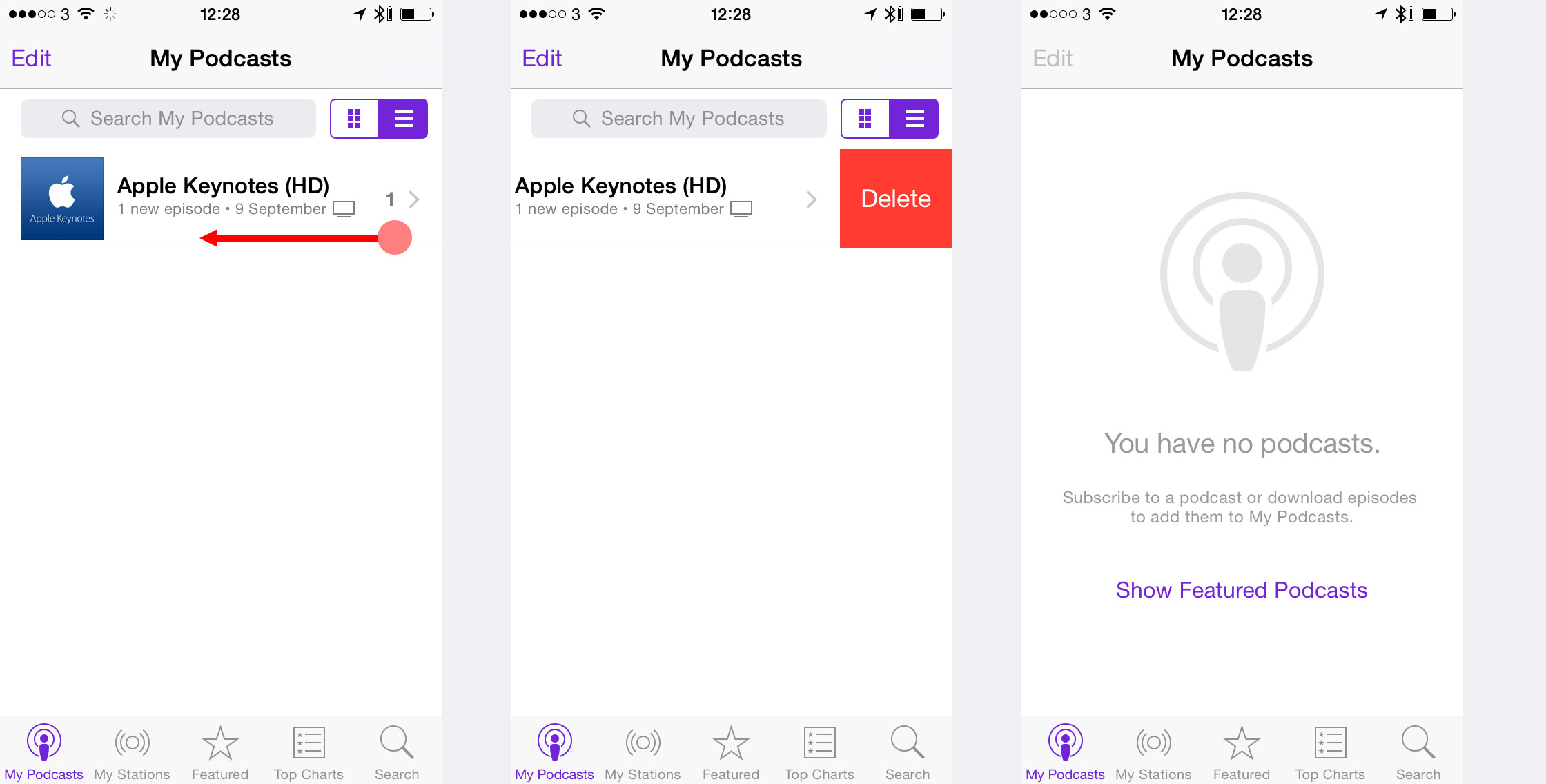
NGUI 3 Support / Re: iOS8 style delete UX functionality
« on: May 18, 2016, 05:28:52 AM »
Correct me if I'm wrong, but it sounds like it would scroll on both at the same time, i.e. if I would move my finger diagonally it would scroll the list and show Delete button partially for the item that I'm touching. That's the behaviour that I'm trying to avoid, i.e. if you do it on iOS8/iOS9 apps it either scrolls horizontally (i.e. you can open Delete button) or scrolls vertically (scrolls the list), i.e. they scrolls directions are mutually exclusive.

And it's not just about delete functionality - there are a bunch of 2 directional scroll views in iOS that work in this mutually exclusive way - you either scroll in one direction or the other, but not in both at the same time.

So I was wondering if there is a native support for that in NGUI?
2
NGUI 3 Support / iOS8 style delete UX functionality
« on: May 17, 2016, 03:54:05 AM »
Hi,

I need to build iOS8 style delete UX functionality. I mean the one where you slide it sideways and a delete button appears.


It also supposed to work if content is in a scrollview.

I though I would try building it using a ScrollView and UISlider (for delete). It kinda could work. One main difference from iOS UX is that it works only on vertical and horizontal axis exclusively, i.e. it slides on one or on another. NGUI just slides on both.

Is there a way to build it in a better way? Maybe there are some dedicated components for that?


3
NGUI 3 Support / Re: Anchors on scaled onbjects
« on: October 13, 2015, 02:48:25 PM »
Well...I wish I could do it that way. Problem is with font resolutions. If your UIRoot.ContentHeight is much smaller than screen height, then all your font will look blurry. A workaround for that is to increase font size and decrease scale on these objects (i.e. double font size, set scale to 0.5), but problem is that then anchors do not work.

So I was wondering how people deal with that.

4
NGUI 3 Support / Anchors on scaled onbjects
« on: October 13, 2015, 04:08:51 AM »
Hi,

It looks like anchors do not work correctly on scaled objects. For example if my object has scale and I set it to anchor on left=0 if won't match to the left of the target object.

Is there a workaround for that?

Thanks,
Paulius

5
NGUI 3 Support / Re: Offset anchor by position
« on: September 13, 2015, 04:57:55 PM »
Sent an email with repro case for Example #2.

6
NGUI 3 Support / Re: Offset anchor by position
« on: September 13, 2015, 03:11:35 PM »
kLOL. I just found the problem for my Example #1 (the repro case that I sent you, so you can ignore that). There was a non-zero value on y position on MenuPage_Main transform, i.e. the panel that I'm trying to offset.

I'll try to create a repro case for problem #2.

7
NGUI 3 Support / Re: Offset anchor by position
« on: September 13, 2015, 03:05:27 PM »
Email with a repro case sent.

8
NGUI 3 Support / Offset anchor by position
« on: September 07, 2015, 03:26:26 AM »
Hi,

I'm having problems with "Offset anchor by position" feature on UIPanel. The problem seems to appear on objects which are NOT anchored to anything.

Example 1

See attached Separators.png. The shown panel moves into the screen from the bottom. It is moved by changing its position and using "Offset anchor by position".

As you can see from the screenshot the labels move in fine, but the separators stay somewhere behind. Labels are anchored to the panel and separators are not.

Example 2

See attached Panel images. In this case window moves in from the right. In this case the whole inner panel is offset to the left (which is counter intuitive - I would expect it to be off to the right, because I though it's caused by some kind of one frame delay). Anyway, it should be centered in the middle. Even more interesting that you can see in the scene view that rendering of gizmos are positioned in correct place, but the generated quads in UIDrawCalls are off to the left.

I marked parent panel with Blue. Child panel visually should be in green position, but it is in red.

Setting up anchors on objects properly doesn't solve the problem. If I remove child UIPanel, i.e. all objects live in the same UIPanel, then everything works (except that I can not do ScollViews :))


Could you tell me if there is a workaround to this problem? Maybe there is a better way to move windows from code?


Pages: [1]