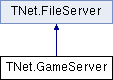
Game server logic. Handles new connections, RFCs, and pretty much everything else. Example usage: GameServer gs = new GameServer(); gs.Start(5127);
More...
|
| bool | isActive [get] |
| | Whether the server is currently actively serving players. More...
|
| |
| bool | isListening [get] |
| | Whether the server is listening for incoming connections. More...
|
| |
| int | tcpPort [get] |
| | Port used for listening to incoming connections. Set when the server is started. More...
|
| |
| int | udpPort [get] |
| | Listening port for UDP packets. More...
|
| |
| int | playerCount [get] |
| | How many players are currently connected to the server. More...
|
| |
Game server logic. Handles new connections, RFCs, and pretty much everything else. Example usage: GameServer gs = new GameServer(); gs.Start(5127);
| bool TNet.GameServer.LoadFrom |
( |
string |
fileName | ) |
|
Load a previously saved server from the specified file.
| void TNet.GameServer.MakePrivate |
( |
| ) |
|
Stop listening to incoming connections but keep the server running.
| delegate void TNet.GameServer.OnCustomPacket |
( |
TcpPlayer |
player, |
|
|
Buffer |
buffer, |
|
|
BinaryReader |
reader, |
|
|
Packet |
request, |
|
|
bool |
reliable |
|
) |
| |
| delegate void TNet.GameServer.OnPlayerAction |
( |
Player |
p | ) |
|
| delegate void TNet.GameServer.OnShutdown |
( |
| ) |
|
| void TNet.GameServer.SaveTo |
( |
string |
fileName | ) |
|
Save the server's current state into the specified file so it can be easily restored later.
| bool TNet.GameServer.Start |
( |
int |
tcpPort | ) |
|
Start listening to incoming connections on the specified port.
| bool TNet.GameServer.Start |
( |
int |
tcpPort, |
|
|
int |
udpPort |
|
) |
| |
Start listening to incoming connections on the specified port.
| void TNet.GameServer.Stop |
( |
| ) |
|
Accept socket callback.
Stop listening to incoming connections and disconnect all players.
| void TNet.GameServer.Update |
( |
| ) |
|
Call this function when you've disabled multi-threading.
| const ushort TNet.GameServer.gameID = 1 |
You will want to make this a unique value.
| const bool TNet.GameServer.isMultiThreaded = true |
Lobby server link, if one is desired. You can use this to automatically inform a remote lobby server of any changes to this server.
| string TNet.GameServer.name = "Game Server" |
Any packet not already handled by the server will go to this function for processing.
Notification triggered when a player connects and authenticates successfully.
Notification triggered when a player disconnects.
Notification triggered when the server shuts down.
| bool TNet.GameServer.isActive |
|
get |
Whether the server is currently actively serving players.
| bool TNet.GameServer.isListening |
|
get |
Whether the server is listening for incoming connections.
| int TNet.GameServer.playerCount |
|
get |
How many players are currently connected to the server.
| int TNet.GameServer.tcpPort |
|
get |
Port used for listening to incoming connections. Set when the server is started.
| int TNet.GameServer.udpPort |
|
get |
Listening port for UDP packets.
The documentation for this class was generated from the following file:
 Public Member Functions inherited from TNet.FileServer
 1.8.8
1.8.8

